
Note: Last updated on 09, 2, 2026 at 12:06 am by admin.
I always use these base-game debug plants when I’m building or playing at The Sims 4. They really amp up my living space. It looks great and is super practical. These debug plants and decorations don’t just make my home better; they turn it into a chill spot.
Your free base game debug plants for The Sims 4 include two outdoor spaces measuring 5 x 13. Explore the excitement of choice with my collection of two unique rooms available for download! You can either try both or choose your favourite to enhance your space. Enjoy the journey!
Base Game Debug Patio items
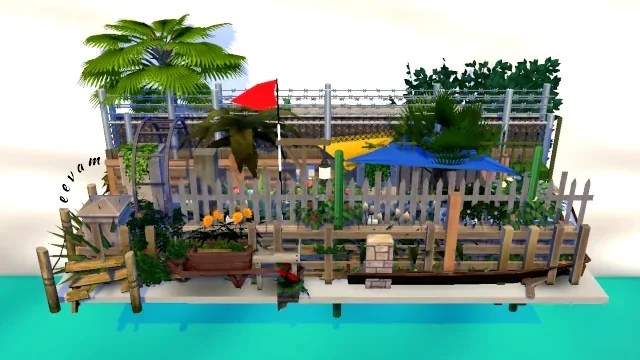
This picture with the red flag shows all the patio decorations for the free game. Each includes 3 or 5 items: patio plants and pots, terrace decorations, fences, various items, and slabs.
Imagine your Sim strumming a guitar under fairy lights. Friends laugh around the firepit. Everyone is surrounded by lush green
plants. My Sims friends and family can hang out, soak in fresh air, and create beautiful memories. These outdoor spaces seriously boost my home vibes. They give me the perfect place to kick back and enjoy some hobbies. My Sims enjoy playing guitar and painting at the easel. I can also dive into outdoor fun. Every moment spent there feels extra special!
What are debug plants | items in the game?
Debug items are special objects in The Sims 4 that are normally hidden in Build/Buy mode. These include decorative plants, rocks, fences, benches, and more, and they add fun and eye-catching details to your Sims’ world. Using debug items can make the game look way cooler by filling it with charming and unique decorations.
These items enhance the Sims’ virtual towns, making them feel more vibrant. Debug items include environmental objects and hidden items. Examples are plants, trees, rocks, fences, and benches. These are not in the regular Build/Buy catalogue. The ones you have here to download are from the free game.
Next, you will find more debug items if you have new packages with extensions to expand your game. They will be related to these packs. The debug items depend on the extension you have. Nonetheless, in this instance, it is merely the base game, and indeed, it is fantastic to have them.
Based on my experience
As a content creator, I always use these debug items. I couldn’t be without them because price is essential when building a lot. Base game debug costs nothing. This flexibility lets me push my creativity. I uploaded these rooms to the EA Official Gallery for everyone to enjoy.
Easy way to get base game | debug plants
Absolutely! To open the command cheat console, press Shift + Control + C. After that, type in-bb.showhiddenobjects- and -bb.showliveeditobjects-. But then you have a long list that takes so long to find anything.
Gather those two debug plants and all the patio rooms, and you are ready to go! With those in hand, you will have everything you need to create a fantastic setting. Let the fun begin! Super easy! Store them in your library game. They will always be available when needed.
Two debug rooms for you
When it comes to building, one of the biggest challenges can be the cost of plants. Yet, with Debug, you can take advantage of a fantastic resource: a wealth of free plants! This means you can focus on crafting your vision without breaking the bank.
Storing items in a small room is challenging, so I used the ‘-move objects-‘ cheat to achieve the desired effect.
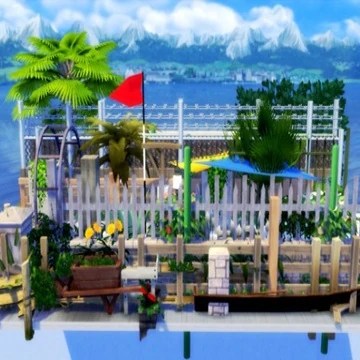
Although there are many items, the two rooms are separate. That is, debug plants (first picture) and debug plants in bulk (second picture). You know what? I say go for it and get both! Why not enjoy the best of both worlds?
Base Game Debug Plants

Incredible debug mode at the Sims 4
These beautiful rooms are part of a debug-free game. They are accessible to everyone playing the free-to-play version of The Sims 4. Dive into creativity without spending a dime!
Explore the exciting additions to elevate your game-play. Craft stunning outdoor environments with vibrant details that enhance the atmosphere and make your game world captivating.
These decorations and goodies jazz up my place, making it the perfect hangout spot.
Download details for your files
Open >
After downloading your free file from SFS, unzip it. Then, copy and paste the files into Documents > Electronic Arts > The Sims 4 > Tray.
You can also download it directly from the EA Official Gallery, which will be in your library. You can access it from my profile @eevam.
Prepared to get started!
Open >
It is that easy—now you are ready to enjoy your new content in the game!
Trigger cheats by typing (testingcheats true) in the cheat console before placing a room on your lot. This is a key first step; it unlocks all the cheat functionalities. After enabling this, you should type -bb.moveobjects – This allows for the precise placement of objects.
Every debug item has been multiplied several times and staggered. This cheat lets you overlap items without restrictions, so your download will look like the picture.
Download SFS files
The two rooms are separate because there are too many items in total to pack.
Download from EA Gallery
Alternatively, you can find it directly in my EA Gallery @eevam. Here is the link to access it!

Dreamy Homes in the Sims 4
I love building in the game. Feel free to explore all the buildings I have created for you. You can download them anytime you like! Each building is available for download at no cost.
Here is a fascinating illustration!
Check out these pictures here to see how awesome the outdoor garden looks. This resulted from using the base game debug plants for The Sims 4. Just look at all that lush greenery! The cute decor is made up of these items.
20 x 15 Sweet home
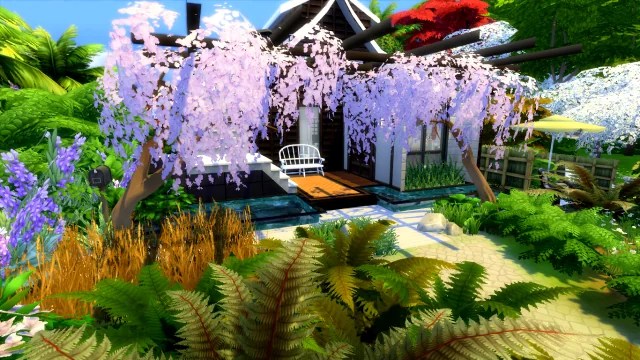
Luxury small 20 x 15 cabin
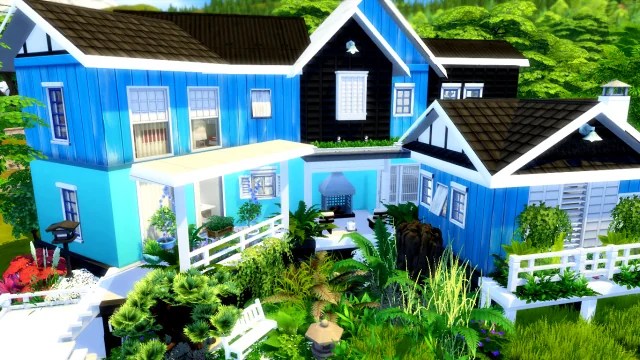
Where can I find these lots?
Some of these creations are available in SFS and can be easily downloaded. However, if you want a closer look, the best option is visit my official EA Gallery at The Sims 4 @eevam. So you can appreciate the elements of my work.
More Available for you to Explore
This is a quick note. Unlock a world of possibilities—countless downloads are just waiting for you to dive in and embrace them! Explore my page to see some incredible paintings! They are perfect for anyone looking to spice up their Sims homes. This significantly enhance the atmosphere in any room, like these portrait collection sets. Also, do not forget to check out my portfolio too!
Swap Stories! Debugging Base Game
Let us unravel the mysteries together
I am excited to hear your thoughts on these debug plants! If you decide to incorporate them into your game, please share your favourite item in the comments below. I would love to see what you choose. For those passionate about home decoration, I have a stunning collection of navy blue canvases. They will complement any aesthetic beautifully. I can not wait to see your feedback!
If you want to spice up your wall with art, I’ve got a page you should check out. Feel free to peek at my portfolio, too!
FAQs
What is the purpose of debug mode?
Debug mode is what developers and programmers use to remove errors and bugs in applications.
What does debugging do in The Sims 4?
The Sims 4 debug box is a total game-changer. It gives players a fresh way to grab even more awesome objects and items. These items are not visible in the standard Build mode. This feature allows builders to enhance their virtual worlds with exclusive elements that can bring their imaginative designs to life.
How to access hidden items in the Sims 4?
To open the cheat console, type “testingcheats true.” A chat box appears. Enter “bb.ignoregameplayunlocksentitlement” to unlock all objects.
What is the cheat for hidden objects?
To trigger the cheat, type “bb.showhiddenobjects.” “bb.showliveeditobjects.” “DEBUG” After doing this, you will see that the items are now available.
Can you duplicate debug items in Sims 4?
No, you can’t. You need to pick these items up one by one.
Download my rooms instead if there are plants and patio items you are after.
 eevam
eevam 